Anime Tears
Prompt, Classic, 3 secondsmouth wide open, crying face, two huge cartoon tear jets spray out from the eyes nonstop
AI sticker makers turn one photo into a sticker that AI draws or animates, and the main difference between them is whether you get a still picture or an animated video sticker.

Point your iPhone camera at the code to get Dappi.
An AI sticker maker from a photo turns a picture into a sticker that AI draws or animates, in a new look or a new scene. On newer iPhones, Apple's Genmoji makes a custom emoji of a person from your photos, and ChatGPT turns a photo or an idea into a set of stickers for iMessage or WhatsApp, though neither describes its stickers as animated. The Dappi sticker app is an AI sticker and GIF app for iPhone that makes animated AI stickers and GIFs. You add a photo and write a prompt for what should happen in the video, and Dappi's AI turns it into a video that starts from that exact photo, ready to send as a GIF in iMessage or a sticker in WhatsApp.
To make an AI sticker from your photo, pick the tool by the sticker you want: Genmoji for a custom emoji of you, ChatGPT for a set of stickers in a style, or an AI sticker app for an animated sticker that starts from your photo.
Without AI, the iPhone Photos app can make a regular sticker: touch and hold the person in a photo and tap Add Sticker. It cuts out what is already in the photo and cannot add a new action, according to Apple's iOS 27 guide, checked on November 8, 2026. For every way to make a regular sticker, see photo to sticker on iPhone.
Genmoji needs Apple Intelligence, which runs on an iPhone 15 Pro, iPhone 15 Pro Max or an iPhone 16 model or later, and is not in every language or region. The steps from Apple's Genmoji guide, checked on November 8, 2026:
Your Genmoji is saved with your stickers, so you can send it as a sticker in Messages. Apple's guide does not describe Genmoji as animated.
ChatGPT lets you upload a photo and describe the stickers you want, then add them to iMessage, WhatsApp or Photos. iGeeksBlog's guide to ChatGPT stickers (August 25, 2026, checked on November 8, 2026) says WhatsApp exports need at least three stickers at a time, and does not call the stickers animated.
In the Dappi sticker app, choose AI Sticker, add your photo, write what you want to happen and tap Generate Sticker, and you get a short animated sticker that starts from your photo. You need the app on iOS 17 or later, signed in to your account.
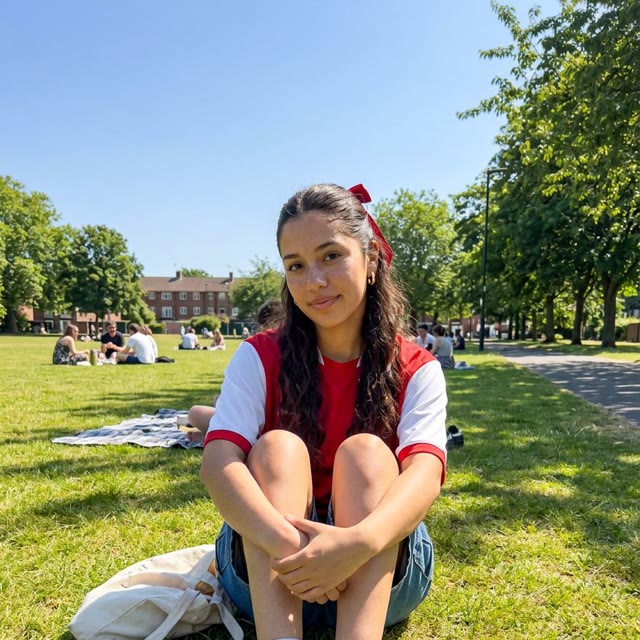
Here is a Classic sticker we made from a photo of a woman sitting in a park:
Prompt, Classic, 3 secondsmouth wide open, crying face, two huge cartoon tear jets spray out from the eyes nonstop
When your sticker is ready, tap iMessage on its page to send it as a GIF that plays in the chat, or tap WhatsApp to copy it and paste it into a chat. Dappi copies the sticker as an animated GIF, and in our tests since July 2026 it arrives in WhatsApp as an animated sticker. The WhatsApp guide has every step.
Dappi is an independent app. It is not affiliated with, endorsed by, or sponsored by WhatsApp LLC, Meta, or Apple. WhatsApp is a trademark of WhatsApp LLC.
Pick the photo that fits your idea, and make it a sharp one, because blur in a photo gets worse when AI turns it into a video. Runway's prompting guide warns that blurry hands or faces may be intensified once an image becomes a video.
A style redraws you in a whole new look, such as clay or pixel art, before the sticker is made. In Apple's Image Playground you tap Style and pick one, like Illustration, or describe the style you want, as its Image Playground guide explains, and you get a still image.
In the Dappi sticker app, the whole animated sticker plays out in the style you pick. Choose one that suits your idea, and the two work together:
For anime and manga looks, and which one to pick for your idea, see the guide to turning a photo into an anime sticker.
Styles need credits or a monthly plan. On the free plan, a style tap tells you "Styles aren't on the free plan", so leave the style on None, or get credits or a monthly plan.
AI Pro in Dappi first makes a new picture of you in a whole new scene, then animates it, for when you want control over every detail of your sticker.
With AI Sticker, your sticker always starts from the photo you added, and the scene changes from there. With AI Pro, it starts straight in a new world, and you see the first picture, and fix it if you want, before it is animated:
AI Pro needs credits or a monthly plan.
Yes, Dappi has recipes: a recipe is a ready idea with the prompt and settings already filled in, and you make it with your own photo. You find the app's recipes on Home and in Explore.
Open a recipe, add your photo and generate your sticker, and the recipe fills in the rest. When you like how one of your own stickers came out, tap Save recipe on its page to keep the whole idea for next time.
Most problems with AI stickers from a photo come from the device, the photo or the plan.
The app keeps getting better, and the team can't wait to show you what is next.
Download Dappi on the App Store